I used to end every stream the same way: close OBS, open my Twitch analytics, and stare at a line graph like it owed me money.
Average viewers. Peak viewers. Follows. A retention curve that dips at 1:42:00 for reasons the dashboard will never explain. I did this for months, and my streams did not get one percent better because of it.
Here's the uncomfortable truth I eventually had to accept: Twitch analytics are a scoreboard, not a coach. They tell you the result of the game. They tell you nothing about how you played.
What Twitch actually shows you
Open your dashboard and this is the entire story Twitch gives you about a four-hour stream:
- Average and peak concurrent viewers
- Follows and subs gained
- Unique chatters
- A viewer-count line over time
That's it. Four hours of you performing live — every joke, every clutch, every awkward silence — compressed into a handful of totals and one wiggly line.
The wiggly line is the one everyone fixates on, so let's talk about it honestly.
The retention graph problem
The twitch retention graph shows when people left. And when you see a drop at 1:42:00, your brain does the thing every streamer's brain does: it invents a story.
"That's when I switched games. That must be it." Maybe. Or maybe the drop started because you spent eleven minutes in a menu deciding what to play next, and the game switch was fine — the dead air before it was the killer. Same drop on the graph. Completely different fix.
A number without context isn't insight. It's an inkblot test — you see whatever you already believed.
This is why staring at analytics feels productive but changes nothing. The data can't distinguish between "boring game" and "boring pacing," between "bad content" and "good content that started three minutes too late." You end up fixing the wrong things, or worse, fixing nothing because everything feels random. (I broke down the five real reasons behind those drops in Why Do Viewers Leave My Stream? — every one is invisible on the graph.)
What the numbers can never tell you
After enough streams, I made a list of the questions I actually needed answered. Not one of them is answerable from the Twitch dashboard:
- Which specific moments were genuinely good — the ones worth clipping and posting?
- Which moments did I completely miss because I was focused on the game?
- Where was I talking but saying nothing — the filler that feels invisible live?
- When chat asked questions or started threads, did I pick them up or steamroll past them?
- Did my stream have any shape — a beginning, rising stakes, a payoff — or was it four flat hours?
These are qualitative questions. They're about what happened, not how many people watched it happen. And they're exactly the questions that, when answered, actually change your next stream.
The coaching gap
The streamers who improve fast all have some version of the same loop: perform, review, adjust. It's the same loop athletes use. Film day exists in every serious sport for a reason.
The problem is the review step. Your options have traditionally been:
- Rewatch your own VODs. Free, but brutal. A four-hour stream takes four hours to review — and you watch it with the same blind spots you streamed with. The dead air you didn't notice live? You won't notice it on rewatch either.
- Hire a streaming coach. Real humans watching your content and telling you the truth is genuinely valuable — and genuinely expensive as a recurring cost, for something you need after every stream, not once a quarter. (I wrote an honest breakdown of whether you need a streaming coach — including where a human still beats any tool.)
- Ask your community. Your regulars love you. That's the problem. "Stream was great!" is loyalty, not analysis.
So most streamers skip the review step entirely and just… stream more. Volume as a strategy. Four hundred hours of unreviewed streams doesn't make you better — it makes you more practiced at your existing mistakes.
What qualitative feedback actually looks like
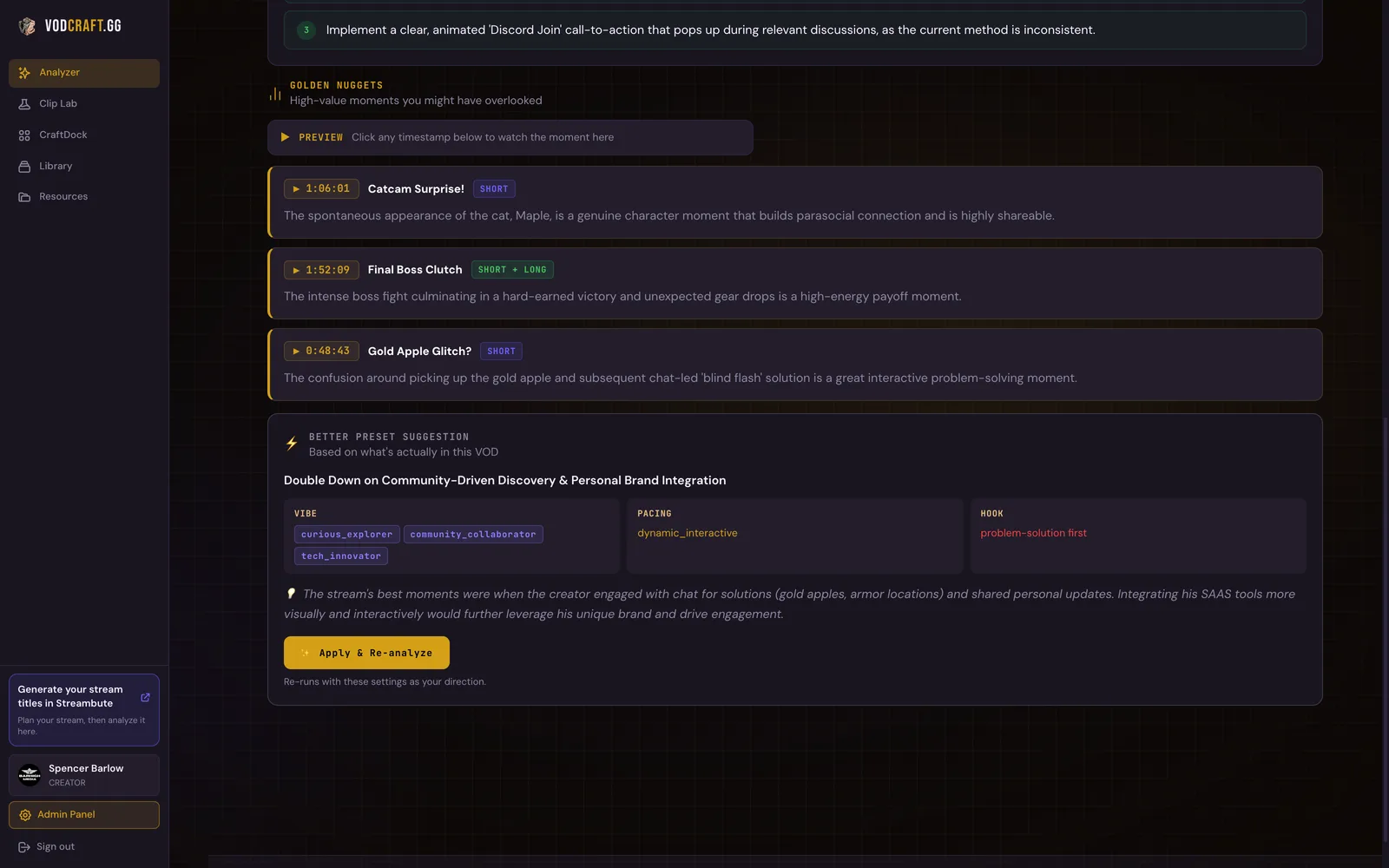
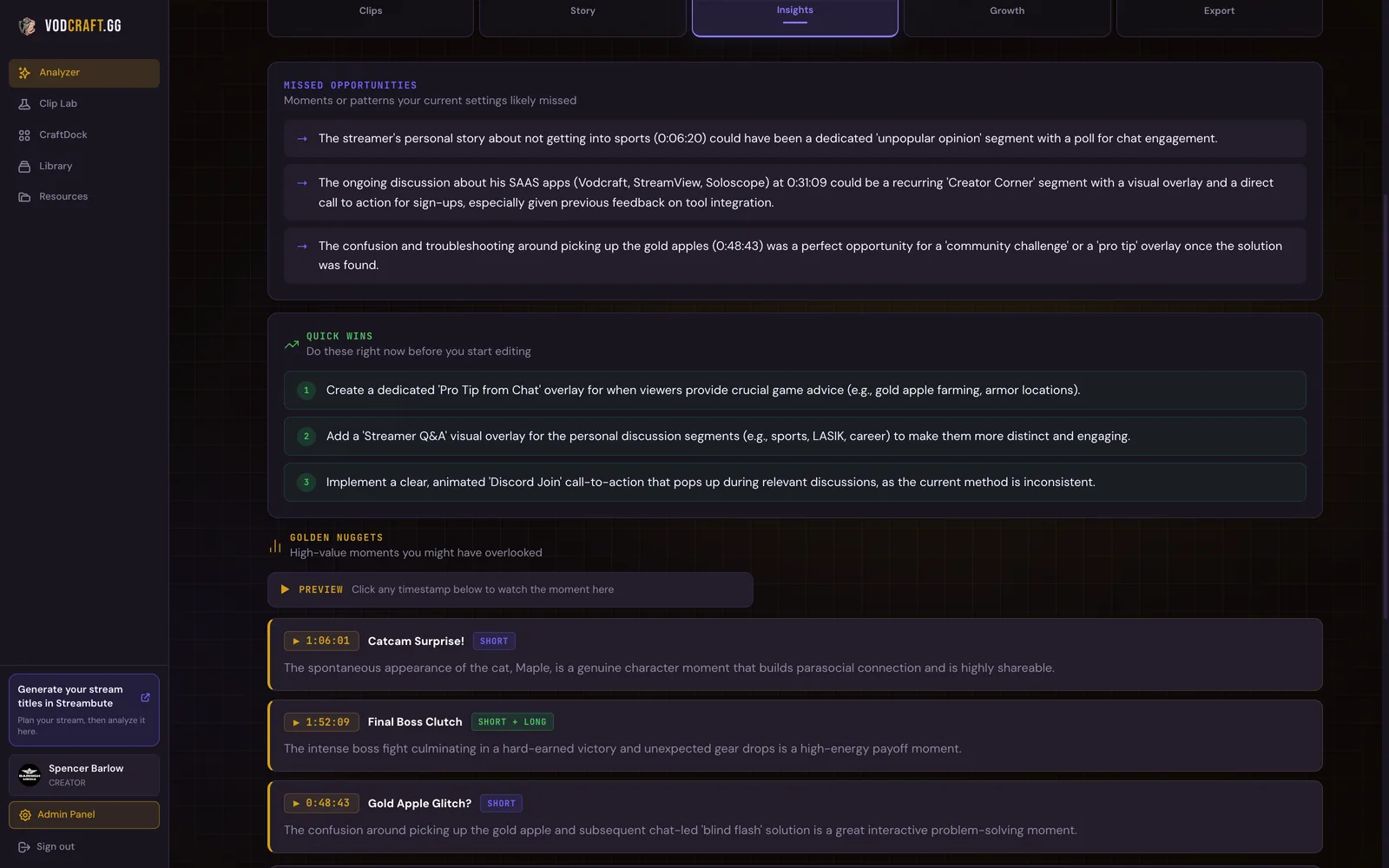
Real stream feedback is specific, timestamped, and honest. It looks like:
- "At 0:47:10 you had your best moment of the night — a genuine scream after a one-HP escape. It's not clipped. Clip it."
- "Between 1:31:00 and 1:42:00 you were in menus with music only. That's where the graph dips — not the game switch at 1:44."
- "Chat asked about your keybinds three separate times. You never answered. That was a five-minute segment they requested and didn't get."
- "Your stream peaked emotionally in hour one. Hours two through four were flat. Front-load the game you're best at, not the warm-up."
Notice what every one of those has in common: a timestamp, a specific behavior, and an action. You could take any of them into your next stream and do something about it. No retention graph in the world gives you that.
The Streamer Blueprint, 90-Day Growth Roadmap, StreamFinance tracker, Media Kit template and more. No cost.
How to actually get it
You have three real options, and I'll be straight about all of them.
Do a manual VOD review — but structured. If you're going to rewatch yourself, don't just watch. Skim at 2x with a notepad and only write down three kinds of timestamps: moments worth clipping, stretches where nothing happened, and chat messages you missed. Even one pass like this per week beats months of staring at graphs. The catch: it still takes real time, and you're still grading your own homework.
Trade reviews with another streamer. Find someone at your level, swap VODs, and give each other the timestamped list above. Other people spot your dead air instantly — they're not attached to it. This is free and genuinely works; the only cost is finding someone consistent.
Let an AI watch the whole thing. This is the gap I built VODcraft to fill — it watches your full VOD (the audio, the chat, the footage) and hands you the timestamped breakdown: the clip-worthy moments scored for virality, the dead air mapped, the chat threads you missed, the narrative shape of the stream. The review step, without the four hours.
VODcraft watches your full VOD — audio, chat, and footage — and surfaces the moments you missed, with timestamps. Free to try.
Try VODcraft free →The takeaway
Your analytics aren't useless — they're just answering the wrong question. They answer "how did it go?" when what you need is "what do I do differently on Thursday?"
So here's the one thing to do this week, whether or not you ever touch a tool: pick your last VOD, skim it at 2x, and write down exactly three timestamps — your best unclipped moment, your longest stretch of nothing, and one chat message you missed. Then build Thursday's stream around fixing just those three.
That's a review loop. It's what the graph was never going to give you — and it's the difference between streaming for four hundred hours and getting four hundred hours better.
The Streamer Blueprint, 90-Day Growth Roadmap, StreamFinance tracker, Media Kit template and more. No cost.
I built VODcraft because I was spending more time scrubbing my own VODs than actually improving my streams. Everything on this blog comes from streaming, failing, and fixing it.