Here's a fact that should bother you more than it does: Twitch deletes your VODs. Seven days for most streamers, 60 for Partners and Prime users. Every stream older than that is gone — not archived, not hidden. Gone.
Which means somewhere in your soon-to-be-deleted backlog right now: your funniest moment of the month, unclipped. Your best play, unposted. Hours of content you already made, already performed, already survived — evaporating on a timer while you plan new content.
The back catalog is the most undervalued asset in streaming. Here's the triage system for mining it before it deletes itself.
First: stop the bleeding (20 minutes, today)
Before any strategy — protect what exists:
- Turn on VOD storage if it somehow isn't (Settings → Stream → Store past broadcasts). You'd be amazed.
- Download the irreplaceables. Twitch lets you download your own VODs. Anything with a milestone — first raid, sub goal hit, a personal best, a legendary chat night — get the file OFF Twitch. Local drive, cloud, anywhere that isn't a countdown timer.
- Highlight the keepers. Twitch Highlights don't expire. A lazy full-VOD highlight is a valid archival move while you decide what it's worth.
That's disaster prevention. Now the actual mining.
The triage: not all old VODs are equal
You don't have time to review everything expiring — so rank. A VOD earns review priority if any of these are true:
- You remember it. Weeks later, you still remember a moment from that stream? That moment is almost certainly clip-worthy. Memory is a virality filter.
- Chat was loud. Scroll your own chat replay at 4x — density spikes mark the moments. Where chat erupted, content lives.
- Something was at stake. Ranked climbs, challenge runs, first playthroughs of big games. Stakes age well; aimless streams don't.
- It's about to expire. Deadline beats quality — a decent moment saved beats a great one deleted.
Everything else? Let it go. Hoarding-guilt is not a content strategy.
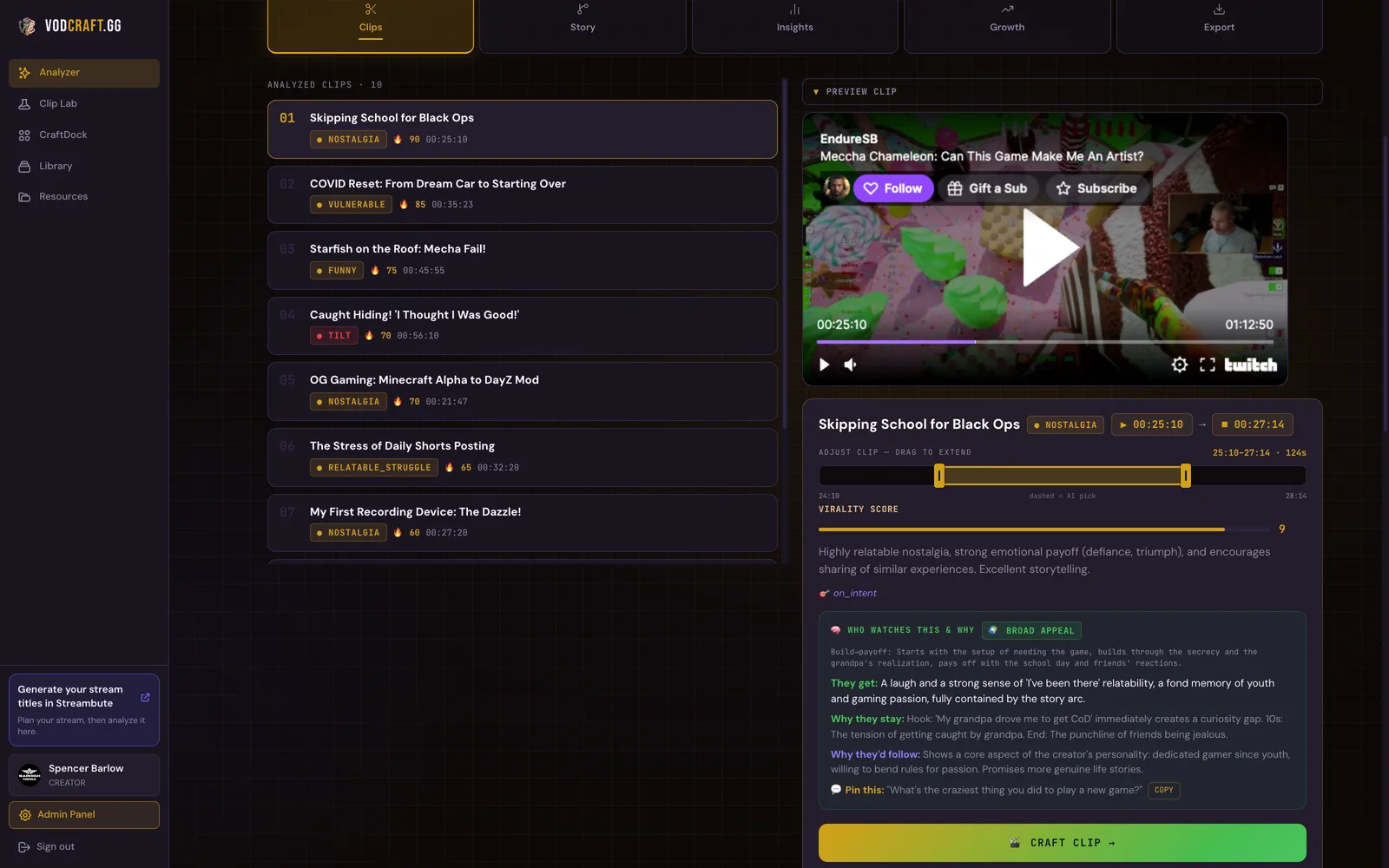
The mining workflow
For each VOD that survives triage, run the standard extraction — the same pipeline as turning a fresh stream into a week of content, with one difference: old VODs are pre-filtered by memory and chat data, so it's faster.
- Jump straight to the moments you remembered and the chat spikes. Timestamp the candidates.
- Cold-viewer test each one — would a stranger watch it? Old inside-jokes age worst; raw reactions and disasters age best.
- Cut the top picks vertical, captions on.
- Flag any VOD with a full story arc (objective → struggle → payoff) for a long-form edit — evergreen content that recruits for months.
The Streamer Blueprint, 90-Day Growth Roadmap, StreamFinance tracker, Media Kit template and more. No cost.
The scheduling trick: old content is new content
Nobody knows your Tuesday clip came from an April VOD. Content is only "old" to you — to the algorithm and to every stranger, it's brand new the day you post it.
This is the cheat code hiding in the backlog: a well-mined back catalog can carry your posting schedule through vacation weeks, burnout weeks, exam weeks — the exact stretches that otherwise reset your momentum. Streamers with a clip buffer never disappear from feeds; streamers without one vanish every time life happens.
Practical buffer math: if one old VOD yields 3–4 postable clips, then mining just four old VODs = two weeks of daily-ish posting banked. That's an afternoon of work for two weeks of insurance.
VODcraft analyzes any VOD — tonight's or one expiring Thursday — and hands you the scored clip list before the timer runs out. Free to try.
Try VODcraft free →The takeaway
Your back catalog is a savings account with an expiration date. Every week you don't mine it, Twitch burns a little of it for you.
This week, in order: download your two most irreplaceable VODs (today — check their timers), then mine the single best expiring VOD into three clips for your buffer. One afternoon. The content you already made is the cheapest content you will ever produce — stop letting the delete timer be the only thing that ever watches it.
The Streamer Blueprint, 90-Day Growth Roadmap, StreamFinance tracker, Media Kit template and more. No cost.
I built VODcraft because I was spending more time scrubbing my own VODs than actually improving my streams. Everything on this blog comes from streaming, failing, and fixing it.