VODCRAFT EDITOR — SCORED CLIPS READY TO EXPORT
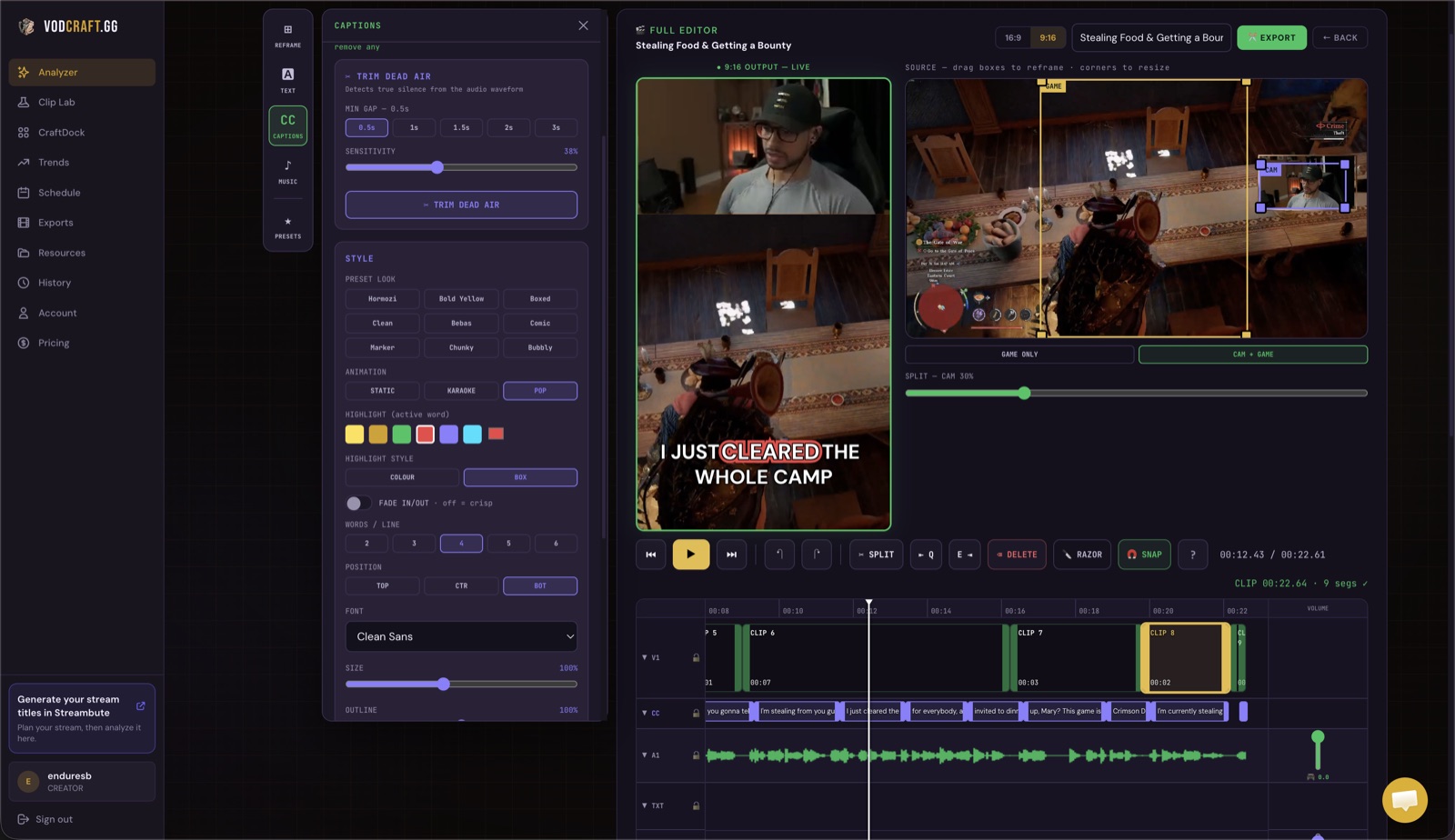
VODcraft turns a long Twitch VOD into an editor-ready FCPXML timeline you import straight into Final Cut Pro. The AI finds and scores your best gaming moments — you finish the cut in FCP with every clip already placed. No scrubbing six hours of footage by hand.
If you stream on Twitch and edit in Final Cut Pro, you already know the painful part: the gameplay was great, but turning a four-to-eight-hour VOD into shareable clips means scrubbing the whole thing on a timeline, guessing where the good moments are. Exporting your Twitch VOD to Final Cut Pro as FCPXML skips that grind. VODcraft watches the VOD for you, scores every moment, and hands Final Cut Pro a timeline with your best clips already cut and placed — so you open FCP and start polishing, not searching.
FCPXML is Final Cut Pro's native interchange format. Instead of exporting a flattened video, VODcraft generates an .fcpxml file that describes a real timeline — clips, in and out points, and order. Final Cut imports it as a project you can fully edit: trim cuts, add effects, color grade, and lay in your own captions and music. You keep total creative control; you just skip the hunt.
From raw broadcast to an editor-ready Final Cut Pro timeline — here's the full path.
Paste a Twitch VOD URL or upload your gaming footage into VODcraft. No downloading, re-uploading, or manual exporting from Twitch first.
VODcraft transcribes the VOD and scores every moment using gaming-native virality signals and Twitch chat spikes, then ranks the strongest clips — clutch plays, fails, and hype peaks float to the top. It even maps the narrative arc of each clip so the cut lands.
In the built-in editor, fine-tune in and out points, reframe gameplay to vertical, and confirm the clips you want. Drag the handles to nudge a cut tighter before you export — those edits carry into the FCPXML.
Choose the Final Cut Pro (FCPXML) export option. VODcraft generates an editor-ready .fcpxml timeline with your selected clips placed in order — ready to hand to Final Cut Pro.
In Final Cut Pro, go to File → Import → XML and select your exported .fcpxml. FCP opens the timeline with every clip already cut and placed. Relink to your source media if prompted, then finish the edit — color, effects, captions, and titles, all your call.
Most auto-clippers were built for talking-head podcasts. VODcraft was built for Twitch gameplay — and for editors who want to finish in Final Cut Pro.
VODcraft reads Twitch chat spikes alongside gameplay and speech to find the moments that actually popped off — not random talking segments. The clutch round your chat went wild for gets surfaced first.
Every suggested clip is scored for its arc — setup, tension, payoff — so the cut has a hook and a punchline. You import clips into FCP that already tell a story, not raw 30-second blobs.
Unlike one-click clippers that only spit out a finished MP4, VODcraft exports a real Final Cut Pro timeline. Trim, grade, and restyle every cut with the full power of FCP.
Need to post fast instead of edit? VODcraft also reframes and captions clips into a ready-to-post vertical Reel — so you choose between a quick export or a deep FCP edit per clip.
When you export your Twitch VOD to Final Cut Pro, VODcraft writes an .fcpxml file — Apple's documented timeline format. It encodes the clip boundaries (your trimmed in and out points), the order of clips on the timeline, and references to the source footage. Because it is the native FCP interchange format, Final Cut imports it without a converter and lays out your project exactly as scored.
This is the difference between a finished render and an editor-ready timeline. A flattened MP4 is done — you can't recut it. An FCPXML drops you into Final Cut Pro at the start of a real edit: every clip is already on the timeline, so your first hour is spent on color, captions, and pacing instead of finding moments. For streamers who care about a polished final cut, that's the whole point.
After importing, Final Cut may ask you to relink media. Point it at your source VOD or the rendered proxies, and the timeline reconnects. From there it's a normal FCP project — add your overlay, your end card, your soundtrack, and export to your channel of choice.
VODcraft isn't Final Cut only. If your workflow lives in Adobe Premiere or Blackmagic DaVinci, the same scored clips export to those editors too:
FCPXML is Final Cut Pro's native interchange format. It describes a timeline — clips, in and out points, and their order — as a file FCP can import directly. VODcraft generates the FCPXML so your clip selections open in Final Cut Pro as a ready-to-edit timeline instead of a single flattened video.
You can do both. VODcraft can export a finished vertical Reel directly, or export an editor-ready FCPXML timeline that references your source footage so you can finish the edit inside Final Cut Pro with full control over cuts, effects, and color.
VODcraft is built for gaming streamers. It scores moments using gaming-native virality signals and Twitch chat spikes, and maps narrative arcs, so clutch plays, funny fails, and hype peaks rise to the top instead of generic talking-head moments.
You can start free. Paid plans — Starter at $9 and Creator at $19 — unlock more VOD processing and exports. Check pricing for the full breakdown, and try the workflow before you upgrade.
Send your next Twitch VOD through VODcraft and import an editor-ready FCPXML into Final Cut Pro in minutes. Free to start.