VALORANT · AI CLIP FINDER

Turn Valorant VODs
Into Clips Automatically

VODcraft watches your full Valorant VOD, scores every ace, clutch and 1vX, and turns the best moments into ready-to-post Shorts, TikToks and Reels — no scrubbing the timeline, no manual editing.

THE PROBLEM

A 4-Hour Ranked Grind, 3 Clips Worth Posting

When you turn Valorant VODs into clips by hand, the math is brutal. A single ranked session can run four or five hours, and somewhere in there are the three or four moments that actually deserve a TikTok — the 1v4 retake on Ascent, the operator no-scope through smoke, the clutch that flipped the half. The rest is buy phases, rotations, and dead air. Finding those moments means dragging a scrubber across hours of footage, and most streamers simply never get around to it.

VODcraft removes that step entirely. Paste a Twitch VOD link or upload your recording, and the AI watches the whole match the way your most clip-obsessed editor would — except it does it in minutes and it never gets bored. It surfaces your highest-potential Valorant moments, ranks them, and hands you vertical clips that are already framed and captioned for short-form.
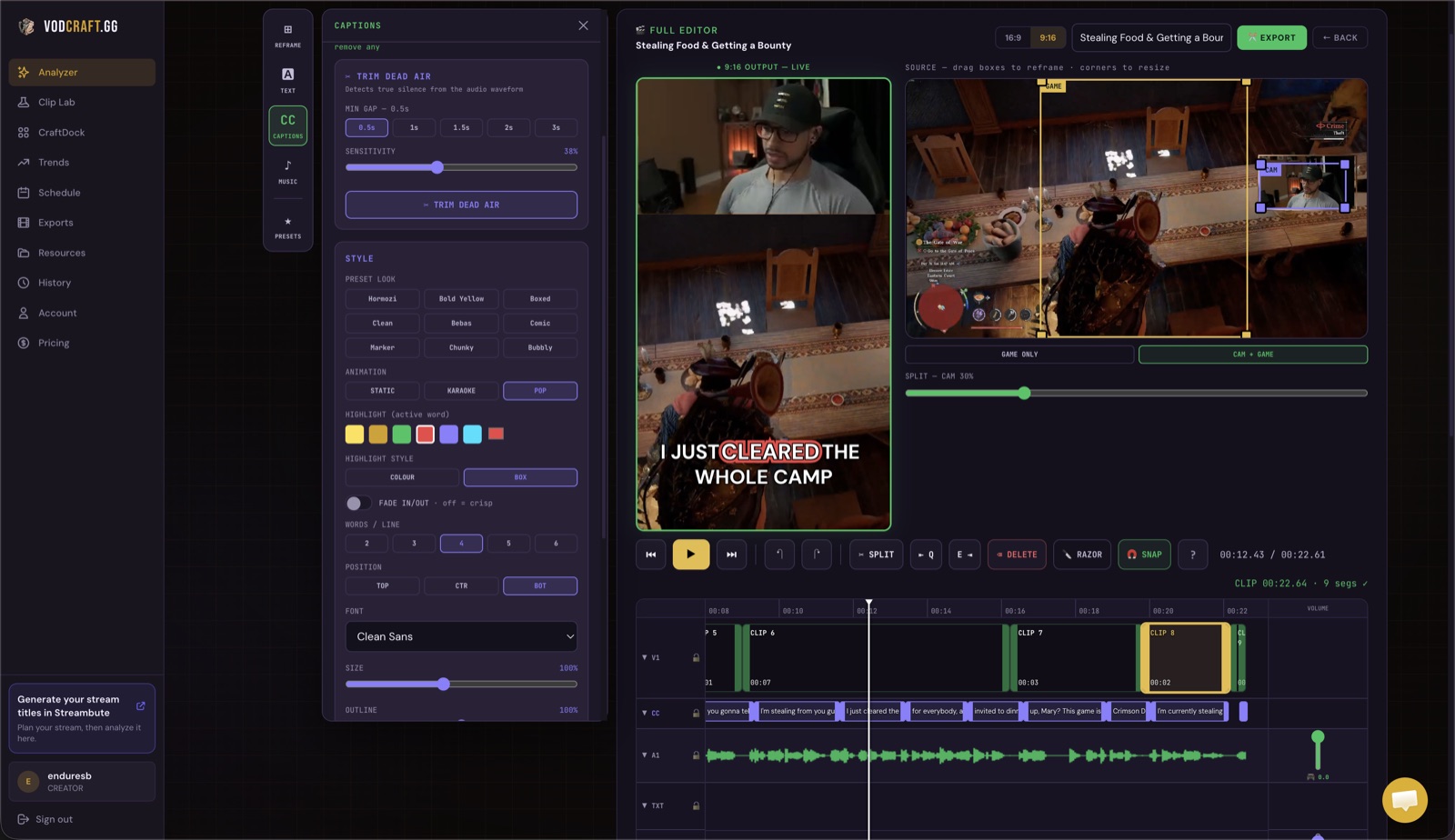
VODcraft editor showing a scored Valorant clip being reframed to vertical 9:16 with captions
THE VODCRAFT EDITOR — REFRAME, TRIM AND CAPTION A VALORANT CLIP IN ONE PLACE
GAMING-NATIVE SCORING

The Valorant Moments VODcraft Hunts For

Generic clip tools listen for loud audio and call it a day. VODcraft is built for gaming, so it pairs your transcript with chat-spike timing and round momentum to recognise the plays Valorant viewers actually share.

🎯
Aces
Five-kill rounds light up chat and your own reaction at the same time. VODcraft catches the spike and frames the whole sequence from first frag to the round-win callout.
🧊
Clutches & 1vX
1v2, 1v3 and full 1v5 retakes are scored higher when chat reacts and your audio peaks — the exact combination that makes a clutch go viral.
🔫
Operator & flick highlights
No-scopes, wallbangs and reaction flicks that earn a "WHAT" in chat get flagged even when they're a single round, not a whole match.
😂
Funny & rage moments
The whiffed easy kill, the team-comms meltdown, the lurker who walks into a 5-stack — narrative beats that perform as well as the highlights.
HOW IT WORKS

From VOD to Posted Clip in Four Steps

No timeline scrubbing, no separate editor required. Here's the whole flow.

01
Import your VOD
Paste a Twitch VOD link or upload your Valorant recording. VODcraft handles long sessions, so a full ranked block goes in as one job.
02
AI scores every moment
It transcribes the VOD, reads chat-spike timing and audio energy, then ranks each ace, clutch and 1vX by how likely it is to perform as a Short.
03
Reframe & caption
Open any suggestion in the built-in editor to reframe to 9:16, drag the in/out trim points and add captions — keeping your gameplay centred.
04
Export & post
Export a finished vertical Reel for TikTok, Shorts and Reels, or an editor-ready XML for Premiere, DaVinci Resolve or Final Cut.
THE DIFFERENCE

Built for Gameplay, Not Webcam Talk

Most "AI clip" tools were designed for talking-head podcasts and IRL streams. Point them at a Valorant VOD and they cut on speech pauses, miss the round that mattered, and crop your gameplay out of frame. VODcraft is different because the scoring is gaming-native: it weighs chat-spike timing and in-game momentum, not just whether someone was talking, so the clips it surfaces are the ones your Valorant audience would have clipped themselves.

It also goes a step beyond raw highlights with narrative-arc detection — recognising the setup-tension-payoff shape of a great clutch — so a clip opens at the right beat instead of mid-spray. That same intelligence powers light coaching context, helping you understand why a moment landed.

And when the AI is done, you're not stuck with a rigid render. The built-in editor lets you fine-tune reframing, trims and captions, and the editor-ready XML export drops straight into Premiere, DaVinci Resolve or Final Cut so your existing edit workflow stays intact. That combination — gaming-native scoring plus a real editor plus XML export — is the wedge that sets VODcraft apart from typical one-click clippers.

Your whole Valorant catalogue, working again

You already have months of VODs sitting unwatched. Each one is a backlog of clips you never made. Run them through VODcraft and turn dormant footage into a steady feed of Valorant Shorts — the kind of consistent posting that actually grows a channel. Start on the Free plan, and when you're ready for more processing, Starter is $9 and Creator is $19 a month.

FAQ

Common Questions

How does VODcraft find the best moments in a Valorant VOD?
It transcribes your VOD and combines that with chat-spike timing, audio energy and round-momentum signals to score every moment. Aces, clutches and 1vX plays consistently rank highest because they pair a measurable game event with a spike in chat reaction.
Can I turn a Twitch Valorant VOD into TikToks and Shorts?
Yes. Paste your Twitch VOD link, let VODcraft score the moments, then reframe the best ones to 9:16 with captions and export ready-to-post vertical clips for TikTok, YouTube Shorts and Instagram Reels.
Do I need editing software to use VODcraft?
No. VODcraft has a built-in editor for reframing, trimming and captioning, and exports a finished Reel. If you prefer your own NLE, you can instead export an editor-ready XML that opens in Premiere Pro, DaVinci Resolve or Final Cut Pro.
Is VODcraft free to try?
Yes. VODcraft has a Free tier so you can turn a Valorant VOD into clips at no cost. Paid Starter ($9) and Creator ($19) plans add more processing and higher limits.

Stop Scrubbing. Start Posting.

Drop in your last Valorant VOD and watch VODcraft pull the aces and clutches you were going to skip. Free to start.

TRY VODCRAFT FREE →
KEEP READING

Related Guides