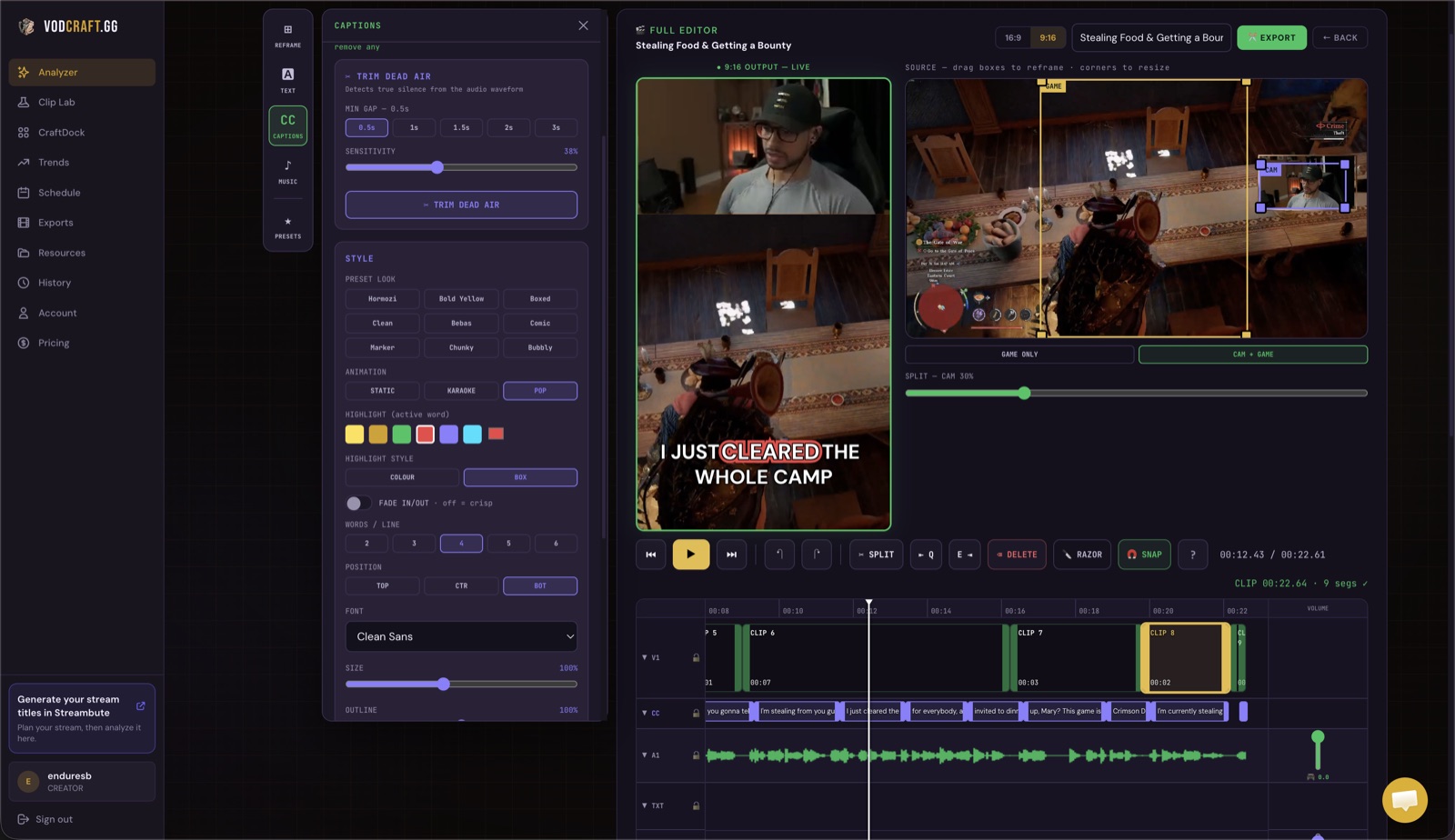
THE VODCRAFT EDITOR — REFRAME, CAPTION, AND TRIM YOUR WARZONE CLIP IN ONE PLACE
Stop scrubbing six-hour VODs hunting for your best moments. VODcraft's AI watches your whole Warzone session, scores every high-kill game, win, and funny clutch, then reframes them to vertical and exports ready-to-post YouTube Shorts, TikToks, and Reels.
If you want to turn Warzone streams into clips consistently, the math is brutal. A single ranked session can run four, six, even eight hours — and the three or four moments worth posting are scattered across all of it. Manually scrubbing the timeline to find that one insane 1v4 clutch, the gunfight where chat lost it, or the back-to-back high-kill games is the single biggest reason most streamers never post Shorts at all.
VODcraft fixes that. Paste a Twitch VOD link (or upload your Warzone recording) and the AI watches the entire broadcast for you. It surfaces the moments that actually perform on short-form — the wins, the high-kill drops, the comedy, the panic — and hands you a ranked shortlist instead of a six-hour scrub. From there you reframe, caption, and export a finished vertical clip, or send an editor-ready timeline to Premiere, DaVinci Resolve, or Final Cut.
Generic clippers cut on volume spikes and call it a day. VODcraft was built gaming-native, so it scores the moments that actually make Warzone content land.
The AI flags your highest-kill drops and dub moments, scoring them by virality so your best gameplay rises to the top of the shortlist first.
Comedy clips, chaotic team wipes, and the unscripted reactions that outperform highlight reels — caught by narrative and tone, not just loudness.
When your Twitch chat erupts, that's a signal. VODcraft reads chat-spike density alongside gameplay to confirm a moment is genuinely clip-worthy.
A great clip has a setup and a payoff. The AI finds the full arc of a clutch — not a cold mid-fight cut — so your Short has a hook and a landing.
No editing background required. The whole flow lives in one browser tab — and you can stop at a finished Reel or hand off to your NLE.
Paste a Twitch VOD link or upload your Warzone gameplay recording. No re-uploading raw footage by hand.
VODcraft scans the full session and returns a ranked list of high-kill games, wins, clutches, and funny moments.
The built-in editor reframes 16:9 gameplay to 9:16, keeping the kill feed, action, and your facecam in frame.
Add auto captions for sound-off viewing, a hook title, and drag the in/out points so every clip lands fast.
Export a ready-to-post vertical Reel, or editor-ready XML for Premiere, DaVinci Resolve, or Final Cut.
Many auto-clippers were designed first for talking-head and podcast content, then adapted to gaming. VODcraft is built the other way around. The virality scoring is gaming-native: it understands that a quiet rotation followed by a chaotic 1v3 is the moment, that a chat eruption is a hard signal, and that the kill feed and minimap matter when reframing — not just the centre of the screen.
It also doesn't stop at "here's a vertical video." When you want full control, VODcraft exports an editor-ready XML you can drop straight into Premiere Pro, DaVinci Resolve, or Final Cut — your cuts, your in/out points, your timeline, ready to finish. That hand-off is the difference between a one-click novelty and a tool you actually build a posting habit on.
And because it was built by a streamer, the narrative-arc and coaching layer tells you why a moment scored well — so over time you get sharper at recognising clippable moments live, not just after the fact. If you want the full feature breakdown, see everything VODcraft does, or jump straight into the free app.
Yes. Paste your Twitch VOD or upload a recording and the AI scans the whole session for high-kill games, wins, clutches, and funny moments, then scores each by virality and chat-spike signals so you start with the best clips first instead of scrubbing the timeline.
Yes. The built-in editor reframes 16:9 Warzone gameplay to 9:16 vertical, keeping the kill feed, minimap action, and your facecam in frame, then auto-captions the clip for sound-off viewing. If you want a deeper walkthrough, see how to reframe gameplay to vertical.
Yes. Alongside ready-to-post vertical Reels, VODcraft exports editor-ready XML you can drop straight into Premiere Pro, DaVinci Resolve, or Final Cut to finish the edit your way.
No — VODcraft works across gaming titles. If you also run tac-shooter content, here's how to turn Valorant VODs into clips with the same workflow.
There's a Free plan to get started, plus Starter at $9/month and Creator at $19/month for more VODs and clips. Compare them on the pricing page.
Stop letting your best drops die in the VOD. Let the AI find them, reframe them, and hand you ready-to-post clips.