HONEST COMPARISON

VODcraft vs Opus Clip
for Gaming Streamers

Opus Clip is a strong tool — but it was built for talking heads and podcasts. If your best moments are silent clutches and mechanical plays, you need a clip AI that scores gameplay the way gamers actually watch it. Here's a fair, factual breakdown.

If you're weighing VODcraft vs Opus Clip for gaming streamers, you've probably already noticed the core problem: most AI clip tools were designed for spoken-word content. Opus Clip does a genuinely good job on podcasts, interviews, webinars, and creators who talk to camera, because its highlight detection leans on the audio transcript to find quotable, self-contained moments. That's a smart approach — for that kind of video.

Gaming VODs don't work that way. The most viral moment in a six-hour Twitch stream is often a silent 1v3 clutch, a flick that ends a round, or a clean mechanical sequence where you say nothing at all. The chat, meanwhile, is exploding. A transcript-first tool has no way to see that. VODcraft was built specifically for this gap: it's an Opus Clip alternative for Twitch that scores gameplay by visual action, chat spikes, and narrative arc — not just what was said out loud.

This page is meant to be useful, not a hit piece. Opus Clip is a real, capable product, and for some creators it's the right call. The goal here is to help gaming streamers pick the tool that actually surfaces their best plays and gets them posted faster.

SIDE BY SIDE

VODcraft vs Opus Clip at a Glance

The honest differences that matter most when your source footage is gameplay, not a webcam talking head.

Capability VODcraft Opus Clip
Built for Gaming VODs & live-stream highlights Talking-head, podcasts, interviews
How it finds clips Visual action + chat-spike + narrative-arc scoring Primarily audio / transcript signals
Catches silent gameplay moments Yes — designed for clutches & mechanical plays Leans on spoken cues
Chat-driven virality signal Yes — Twitch chat spikes feed the score Not a core signal
In-app editor (reframe, caption, cut) Yes — finish a Reel without leaving the app Yes — web editor for spoken-word layouts
Editor-ready XML export Yes — Premiere, DaVinci, Final Cut Web-editor focus — check current plans
Pricing model Flat plans — Free, $9, $19 Credit / per-minute tiers
Long multi-hour VODs Flat pricing — no metering on length Usage-based plans — longer VODs use more

Comparison based on each product's positioning for gaming use cases. Opus Clip features and pricing change over time — always check their current plans before deciding.

Why Gaming Clips Need a Different Engine

Transcript-first detection assumes the value of a moment is encoded in speech. On a podcast, that's usually true — the punchline, the hot take, the story beat all live in the words. On a gaming stream, the value is on screen and in the room. Here's where the approaches diverge in practice:

  • Silent highlights. A no-comms clutch in Valorant, a perfect combo in a fighting game, a wallbang in CS — these can be your single most clippable second of the night, with zero spoken words to anchor a transcript search.
  • Chat is the crowd. When your Twitch chat erupts with emote spam and "CLIP IT," that's a real-time virality signal. VODcraft folds chat-spike intensity directly into its clip scoring, so the moments your community already reacted to float to the top.
  • Narrative arc & coaching. VODcraft doesn't just grab a 12-second spike; it understands the build-up, payoff, and aftermath so clips have a story. It can also surface coaching-style context around a play, which matters for gameplay-focused channels.
  • Reaction-only segments. Sometimes the clip is the talking — a rage moment, a clutch callout. VODcraft still uses what you say; it just doesn't depend on it the way a transcript-first tool must.

None of this means Opus Clip is bad at its job. It means the job is different. If you're a just-chatting or IRL creator who talks constantly, the transcript approach can work well. If you're a gaming streamer turning long Twitch VODs into Reels and Shorts, you want an engine that sees the play and hears the crowd.

Edit In-App, or Export to Your Editor

Finding the clip is only half the battle. After detection, VODcraft gives you two genuinely different finishing paths — and the second one is a real wedge most clip tools don't offer at all:

  • The built-in editor. Reframe vertical for Reels, TikTok, and Shorts, add captions, and tighten the cut without leaving VODcraft. You can go from raw VOD to a ready-to-post vertical clip in one place.
  • Editor-ready XML export. Prefer to finish in your own NLE? VODcraft exports a timeline as XML you can open directly in Premiere Pro, DaVinci Resolve, or Final Cut Pro — cuts and selections intact. So you can finish in the pro tools you already use instead of being limited to one web editor.

That export path is exactly why editors and serious channels treat VODcraft as their detection-and-rough-cut layer: the AI does the tedious VOD-scrubbing, and you keep full creative control in your timeline. If that's your workflow, the dedicated guide on exporting Twitch clips to Premiere Pro walks through it step by step.
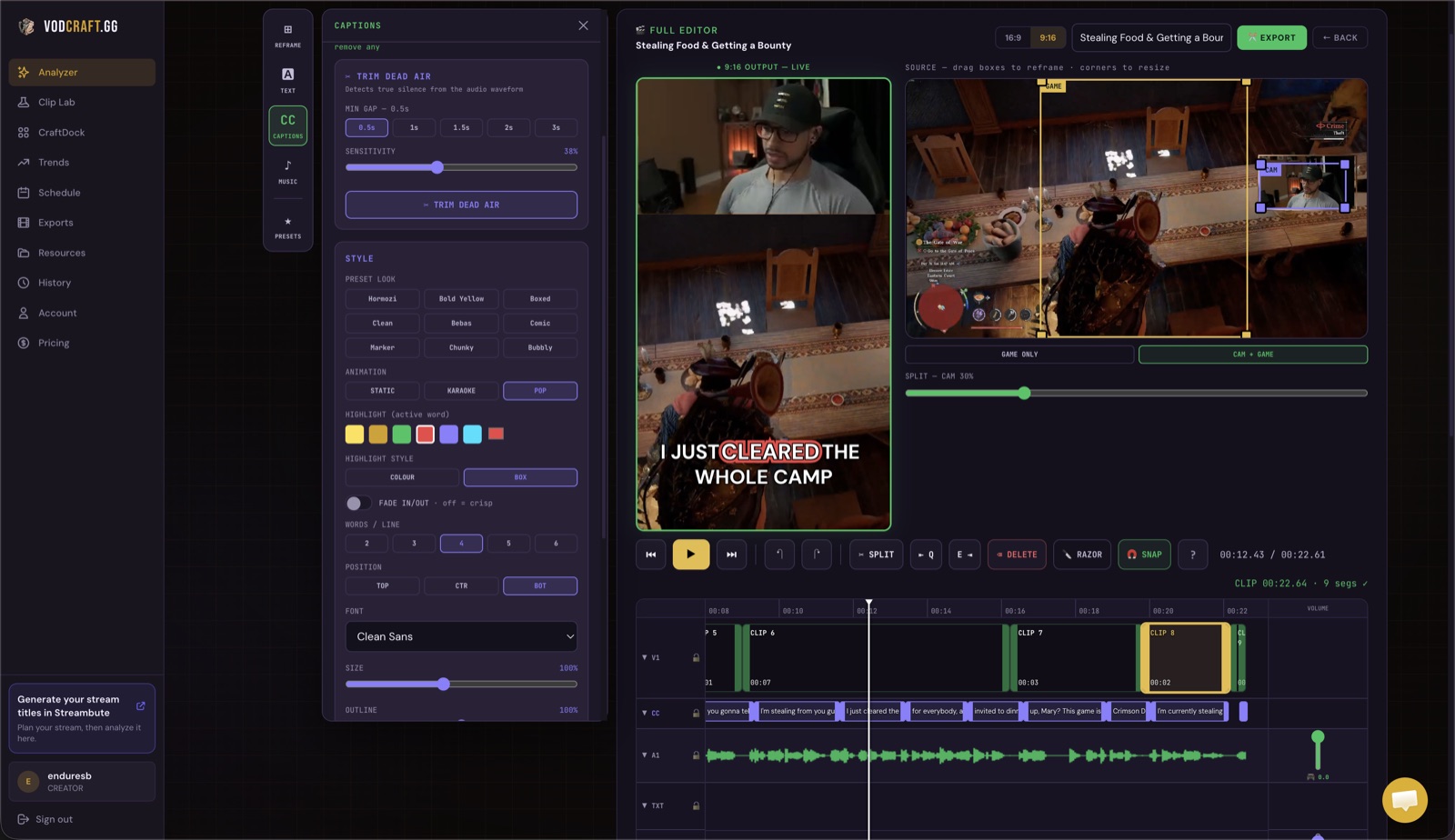
VODcraft in-app editor showing a Twitch gaming clip reframed vertically with captions, ready to export as a Reel or editor-ready XML.
VODcraft's in-app editor: reframe, caption, and cut a gaming clip — then export a Reel or editor-ready XML.

Pricing: Flat Plans vs Credit Burn

Gaming VODs are long. A typical session is three to eight hours, and that's where per-minute or credit-based pricing gets painful — a single marathon stream can eat a big chunk of your monthly allotment before you've found a single clip you like.

VODcraft keeps it simple with flat plans: Free, Starter at $9/mo, and Creator at $19/mo. The free tier means you can run a real VOD through it before paying anything, and flat pricing means a six-hour stream doesn't cost more to process than a one-hour one. Compare full plan details on the VODcraft pricing page.

Bottom line for gamers: if your content is gameplay, you'll get more usable clips from an engine that reads visual action and chat spikes — and you'll keep more money when long VODs don't trigger credit overages.

Which Tool Should You Pick?

Choose Opus Clip if…

  • Your content is mostly talking — podcasts, interviews, react, or webcam commentary where the value is in what you say.
  • You want strong transcript-driven highlight detection for spoken-word video.

Choose VODcraft if…

  • You're a gaming streamer turning long Twitch VODs into clips, Reels, and Shorts.
  • Your best moments are often silent — clutches, combos, mechanical plays — and you want chat spikes factored into the score.
  • You want to finish in a built-in editor or export editor-ready XML to Premiere, DaVinci, or Final Cut.
  • You'd rather pay flat $9/$19 than burn credits on multi-hour streams.

Not sure where to start? You can skip the editor entirely and let the AI do the work — see how to clip Twitch VODs without editing, or just point VODcraft at a recent VOD and see what it surfaces.

FAQ

VODcraft vs Opus Clip Questions

Is VODcraft a good Opus Clip alternative for Twitch?

Yes. Opus Clip is tuned for talking-head and podcast content and leans heavily on the transcript, so it can miss silent gaming highlights like clutches and mechanical plays. VODcraft scores Twitch VODs by visual action, chat spikes, and narrative arc, which is built for gameplay where the best moments often have no spoken cue.

Does Opus Clip work for gameplay with no talking?

Opus Clip can clip any video, but its highlight detection relies largely on speech and transcript signals. Pure-gameplay moments such as a silent 1v3 clutch or a precise mechanical play often produce little or no audio cue, so they can be overlooked. VODcraft's chat-spike and visual scoring is designed specifically to catch those moments.

Can VODcraft export to Premiere Pro, DaVinci Resolve, or Final Cut?

Yes. VODcraft exports an editor-ready XML timeline you can open directly in Premiere Pro, DaVinci Resolve, and Final Cut Pro, so you can finish clips in your own editor instead of being locked into a single web tool.

How does VODcraft pricing compare to Opus Clip?

VODcraft uses flat plans: Free, Starter at $9, and Creator at $19. There's a free tier so you can test it on a real VOD before paying, and flat pricing avoids the per-minute credit burn that can add up fast on long multi-hour gaming streams.

Does VODcraft auto-post clips to social media?

Not yet. VODcraft helps you find, edit, caption, and export clips, and supports planning and scheduling your posting workflow, but it does not automatically publish to social platforms on your behalf at this time.

Run a Real VOD Through VODcraft

The fastest way to settle the comparison is to try it on your own footage. Point VODcraft at a recent Twitch VOD and see which clips it surfaces — free, no credit card.

KEEP READING

Related Guides